
Recently i started to cook my own ROM with manila 2d. I customized my Own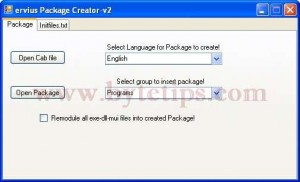 windows Mobile ROM with useful utilities. I converted CAB file to OEM package for Kitchen and windows mobile Roms. I added latest version of manila2d, winrar, Latest Google maps, Total commander, My Faves OEM Package etc.My T- Mobile MDA ( windows mobile wizard) got a New Life. To create a OEM Package from a cab i used a tool named Package creator. This Tool can convert pocket pc cab installers to OEM package for windows mobile Rom Kitchen. I used Core Kitchen and Wizard Build OS Kitchen with the package. Now i am running my own Customized Windows Mobile ROM. I added a little tutorial to show how to convert cab file to ROM Package. You can see a Screenshot of package creator on the top.
Follow this steps
- At first download latest version of package creator from here: package creator v2.7.
- After downloading the package creator Extract to any folder and run package-creator-v2.7.exe. Select language and select group to insert package. Here The group reffers to Programs. You can add or edit lang.xml to add or delete groups.
- Then click on Open Cab File and navigate to your cab file and Click Open.
- Wait until it shows you done Confirmation window. Then navigate to the cab folder and you will see new folder with OEm package. This tool will generate initflashfiles.txt, option.xml, .dsm and .rgu for the kitchen ROM.
- Copy the OEM package to your kitchen and have fun with customizing your Rom.
Note: You can also open package folder from this tool. I tested the OEM packs with wizard and its working fine.