
Do you know what is game trainer? How to use game trainers? Most of the Gamers know about Game trainers. Game trainers are programs made to modify behavior of a computer game. If a game is hard and you want to cheat the game Then you need cheat code for that game to enable unlimited health, unlimited ammo etc. If there is no cheat code included for that game so what can you do??
How to find a game trainers: You can use game trainers for cheating the game. Search in google for your game trainer. you may find some trainers for your game. For example if you are looking trainer for Game Halo Just search in Google Halo Trainer you will find a lot of them. Download and read the instruction Inside.
Before you start using any of these Trainers be sure to do the following…
1. Read the DISCLAIMER and then download the Trainer
2. Then Unzip it to the game directory and read the the text file that explains how to use the Trainer Follow the exact directions given in the text file. Almost always the Trainer works if the versions match.
Fore example I used following for one of my games.

3. Most of the game trainer access memory to enable the game cheat code. Start that first copy the game trainer in game directory. Then run your game and then press Alt+ tab to switch back to Game Directory. Run the trainer now and switch back to game pressing Alt+ tab. Now press the keyboard keys ( As the trainer instruction Explained) to activate cheat codes.
For example I would use instructed hot key on the trainer.
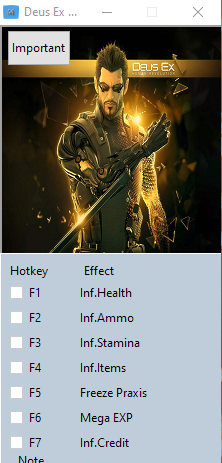
Your system Anti virus or firewall can may alert you its as a spyware ( cause it access memory) or virus.. skip or allow the actions. Have fun using trainer. To know more about Game trainers and cheat code you can Read Here : Cheating game
Hey, got a question about the game trainer. I was using one about a week ago and then stop playing. but then i wanted to play again after a month and then suddenly i can’t use the trainer any longer. what gives?? is it because of my antivirus? or windows 7??
check your antivirus/ firewall log … if it blocks the trainner then add the trainer to trusted application list. It should fix the problem.
Check game version and make sure its compatible with the trainer otherwise check for any updated trainer…
hey, im having trouble unzipping/extracting trainers now all of a sudden. i can unzip/extract em, but it only takes the readme file, and if it takes the actual trainer application, its in the zip format which i cant use. any idea’s/help. it’d be greatly appreciated. i was able to use em jus fine the other day, then all of a sudden its not extracting right…. :/
Check your antivirus software. Some trainers are identified as trojan. Sometimes its a false positive. But be very careful about this.