
Rss Feed
Tweeter button
Facebook button
Technorati button
Reddit button
Myspace button
Linkedin button
Webonews button
Delicious button
Digg button
Stumbleupon button
Newsvine button
Youtube button

Disable indexing service In XP

November 21, 2008 Poster: Jim Views: 871 views Category: Windows

Welcome, Visitor. Subscribe to our RSS Feed and consider adding this article/site to your favorite social bookmark site if you find it useful. Thank you!

At first you need to know what is windows indexing service ? Indexing Services is a system process indexes and updates lists of all the files that are on your computer. When you search for something on your pc, it helps to search faster by scanning the index lists. If you don’t use search on your computer often, then you can disable file Indexing service from windows to save some system resources. Because it uses a large amounts of memory. Did you heard noise when your pc was idle? Ever wondered why noisy? The answer s Indexing Service often makes a computer noisy. To disable this service follow this steps:
1. Click Start button then go to Control Panel
2. Then Double-click on Add/Remove Programs and Click the Add/Remove Windows Components icon on the left side of the window.

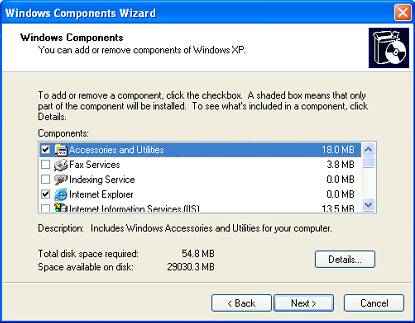
3. A window named Windows component wizard will show up like this screen-shot
windows indexing service 300x233 Disable indexing service In XP
4. then you have to look for the “Indexing Services” component in the list
5. Uncheck the Indexing Services and Click Next
6. And finally Click Finish

Share This:

This Seems Useful!! Help Us To sahre This Post with Rest Of The World
  • Digg
  • StumbleUpon
  • Technorati
  • del.icio.us

Subscribe:

Sign up to receive latest Tips & Tutorials
as well as receive other site updates!

Related Post

Disable indexing service In XP
Turn on your pc faster

Do you know how to turn the pc on in few seconds?  Just you have to edit registry and tweak your system. Click on the start button then press...

Disable indexing service In XP
Hiding Welcome Screen

Its Real Easy to Hide Your welcome screen. Just You need to tweak your registry Go to Start > Run>Then type regedit Then find or create the key...

Disable indexing service In XP
Removing the shutdown option

Here is An Interesting Tricks I found while browsing. Remove shutdown option from start menu in your windows...

Disable indexing service In XP
Hidden Funs in XP

I have collected some Hidden fun in Windows xp. Have Fun. 1. Application Secrets. Defrag Secret - Hidden Command Line...

Leave a Reply

Please note: Comment moderation is enabled and may delay your comment. There is no need to resubmit your comment.


Recent Posts