
Fast Loading Featured post slideshow For WordPress

May 23, 2010 Poster: Jim Views: 784 views Category: wordpress hacks

Welcome, Visitor. Subscribe to our RSS Feed and consider adding this article/site to your favorite social bookmark site if you find it useful. Thank you!

I wrote a tutorial on how to add  random featured post section for wordpress.You can check it here : Random Featured post for wordpress. This time i am going to cover on how to add featured post slideshow on your wordpress blog. You can select your featured post from wordpress admin panel. You can even set option to  use first image on the post (auto) .

Featured post slideshow WordPress

Featured post slider will look like the picture above. You can change the text color, images ETC to match the featured post slider with your wordpress theme. To add features post for wordpress follow rest of the tutorial :

1. There are many plugins on wordpress.org to add featured post slide. But we are going to add simple fast loading wordpress pluging named Smooth Slider. Download the plugin from here:
Smooth Slider - http://wordpress.org/extend/plugins/smooth-slider/

Now upload and activate the plugin from your wordpress admin panel.

2. Now go to your post editor and edit a post. Scroll down and you will see the option like the picture bellow.

Post slider  Fast Loading Featured post slideshow For Wordpress

Check mark the box and save changes. This will add the post to the slider as a featured post.

3. Go to admin panel > settings > Smooth Slider. Then change the color size, Fonts ,settings and customize it as you like. Then save your changes on clicking on save changes button. You can see the preview from the smooth slider option panel.
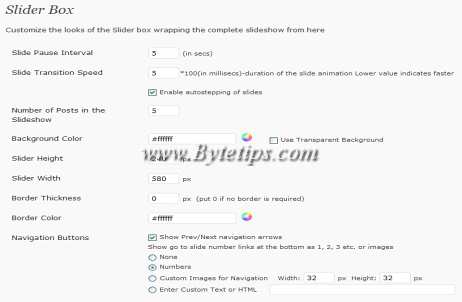
Somooth slider Option Fast Loading Featured post slideshow For Wordpress

4. After saving all the settings go to your wordpress Admin panel > Appearance > Editor. Now add this PHP code on your Main Index Template or your wordpress Theme.

 <?php if ( function_exists( 'get_smooth_slider' ) ) {
     get_smooth_slider(); } ?>

Now you should have a featured post slider on your wordpress blog.

Tags for the article:

    WordPress Featured Post Slideshow,featured posts slideshow,featured post slideshow,wordpress featured post slider,wordpress post slideshow,wordpress slideshow,wordpress featured slideshow,wordpress featured posts slideshow,featured post slideshow wordpress,fast loading wordpress themes

Share This:

This Seems Useful!! Help Us To sahre This Post with Rest Of The World
  • Digg
  • StumbleUpon
  • Technorati
  • del.icio.us

Subscribe:

Sign up to receive latest Tips & Tutorials
as well as receive other site updates!

Related Post

ByteTips Remix wordpress theme Released

Two days ago an request for making a three column wordpress theme. I mixed the idea of my other wordpress themes on this theme and going to...

Wordpress Theme Bytetips

I got a request from a blog reader about posting update on my wordpress 2.7 compatible themes.If you liked this wordpress theme, you might like...

Wordpress theme Bytemix Released

Bytemix is a Free WP Theme, featuring 2 columns layout with Left sidebar. Before i designed 3 columns wordpress theme Bytetips for wordpress...

Leave a Reply

Please note: Comment moderation is enabled and may delay your comment. There is no need to resubmit your comment.