
I got a request from a blog reader about posting update on my wordpress 2.7 compatible themes.If you liked this wordpress theme, you might like Other wordpress 2.7 theme Designed By me.
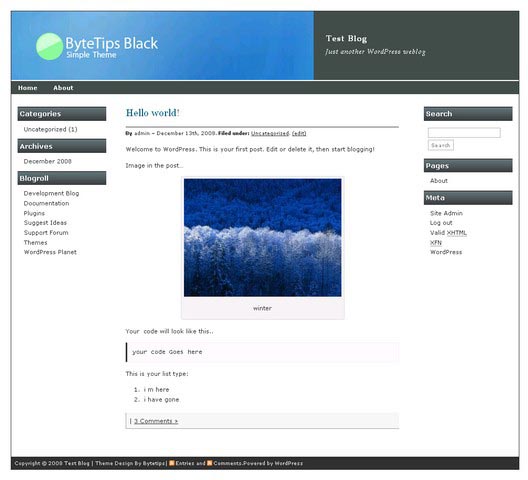
Bytetips Theme Update:
Version 2.8
Import command on css doesn’t work with some plugins. Removed @import command and Fixed some issue. For New version Here check here: Download
Version 2.5
With sidebar fixed for internet explorer. Added Some style bassed on New Theme Bytemix .
Version 2.0
Added theme support for wordpress 2.7, Tweaked Comment display style. Download it here.
version: 1.6
For those who have problem with category image they can try this version from here Fixed Ver
version: 1.5
Added Pagination in the theme , Fixed some CSS Issue.
Bytetips Theme Update version: 1.4
Changes: Fixed some Css Issues, Removed Dotted Border and fixed some other Problems.
Bytetips is Free WP Theme, featuring 3 columns layout with Left and right sidebar, valid CSS, Valid XHTML and widget ready. A simple theme bloggers . Working on Another adsense ready theme. Until then..
Edit: October 04 2008 I checked this theme with WordPress Version 2.5 and 2.6 . Its compatible with WordPress Version 2.6. Have fun.
If you want to change the Logo then you have to create your own image/ logo. Make a logo and rename it head.jpg After making a logo go to theme directory. Then go to Image directory. Ex ( bytetips/images) and replace head.jpg with your logo. You are done for this part.
If you want to change the color then you have to edit style.css file ooen this file in editor and find this
#header {
background: #454D4E url(images/head.jpg) 0 0 no-repeat;
width: 100%;
height: 131px;
color: #fff;
}
then change this 454D4E with what ever color you like. You will get a lot of color code here http://html-color-codes.info
If you want to get rid of Search plz remove it from your admin panel Design > Widgets
and remove it from sidebar2 . Have fun I hope i answered your question
Adding Pagination in the theme : I use WP-PageNavi plugin. I f you don’t want to use that plugin and using ver 1.4 or 1.3 you can add these option manually. I shall add This option in this theme in next update no 1.5 . But for now You can manually by following the steps. Go to theme editor Edit Main Index Template (index.php) find
and Replace this code with this
Update: Updated Some Options, Added Tags And Fixed Some Issues. Works With Latest WordPress Version.
Download Link:
Now its Listed On WordPress Theme Directory. You can download from Worordpress .org or from My Blog> here is the Links enjoy.
From WordPress theme Directory: Download
Also Feel free to download this theme Here: Download
thanks for share
thanks for you hard work
Sorry im italian
Your theme is fantastic..
Please can yuo in email ….your template..yes your theme of home page..
Pleaseeeeeee im noob!!!
sorry
Thank’s
@MIRAGGIO –
I already shared my theme Bytetips here. But But which theme you are talking about??
This theme
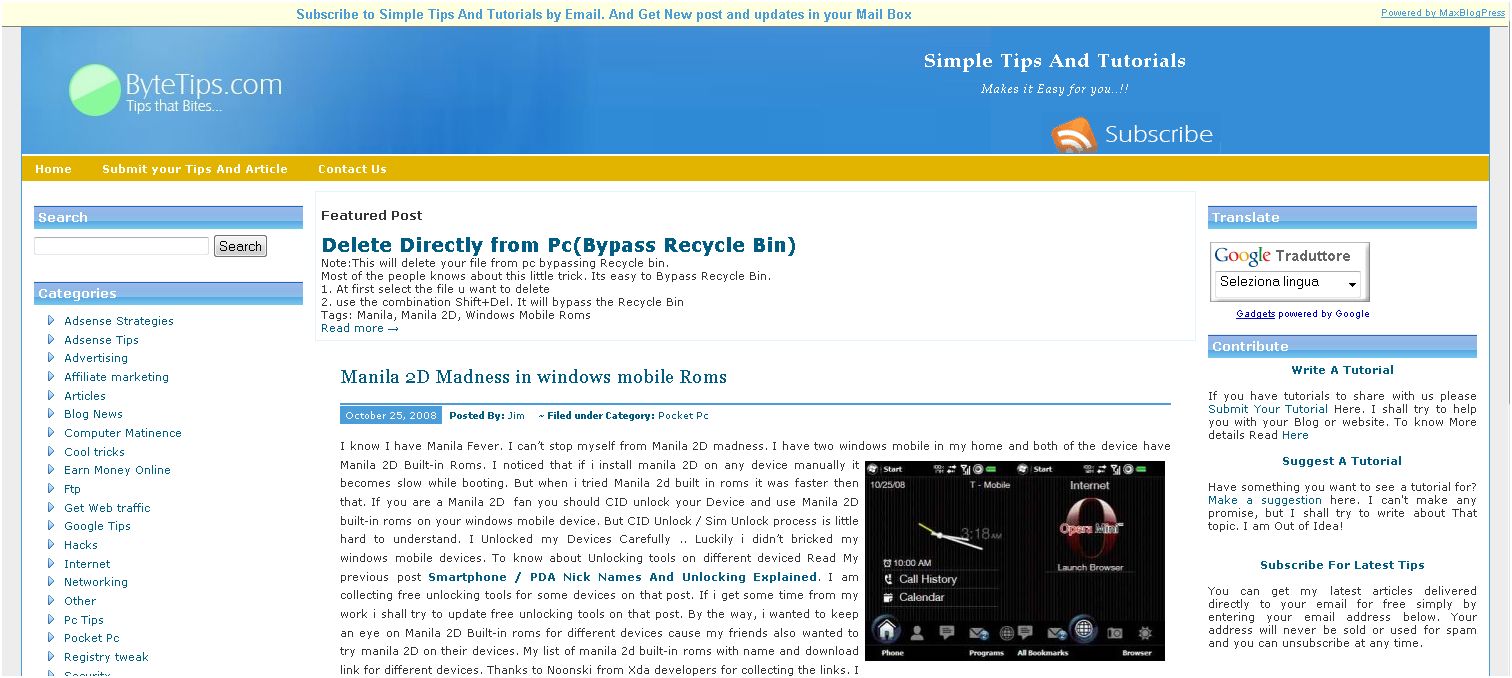
with this font
and this color
please…. sorry but i’m not good modification the template
@MIRAGGIO –
I tried to make this theme Unique. Cause i wanted to make my blog in unique design. I am not planing to release this theme. This theme have lot of parts and plugins. This is another version of Bytetips Theme.Sorry about that!! i hope you understand. I shall try to make other themes based on this theme.
hello,
are Italian
your template is very beautiful.
How can I remove windget included in the template
Cioa
Thank you
poreddu
@poreddu –
i didn’t added any widget to this theme. It worksr with default wordpress widgets. You can add remove widget from Design option.
thanks..ok
Should I put the code in sidebar.php, but I can not find the file
What I have to file amended to include a code for a php shutox
Hello
Thank you
@poreddu –
You have to add the code in left.php or right.php. If you want to add html or javascript on your sidebar you can use this plugin here
Thanks a lot
Your template is the most beautiful that has found.
E ‘can insert a’ background image at the center of the blog
Hello
Thank you
Hi, Thanks for the theme. I am testing it for my new travel & wildlife website. Any way I can add a thing line between columns?
Thanks a lot,
Jorge
thanx alot boss how to put code in a blogger plz help me………
@deepthi –
This theme is only for wordpress. You can’t use this on blogger.
Very nice theme! However, the right column gets the infamous blank white space above it when using IE6. Is there an easy fix for this issue?
@Magnus –
i fixed this issue in new version. I am going to upload the new version soon. It was a css code issue. I hope you will like the new version.
Superb Jim, look forward to it!
I temporarily solved this – by chance. I like white borders on fluid themes, so I set the #container width to 90%. I have no idea why this fixed the misplacement. IE6 works in mysterious ways.
Feel free to post some news about the upcomming version 🙂 Should I keep modifying v2.0 to fit the site I am working on, or do you advice I wait for the revolution?
BTW: I added #left/#right a and #left/#right a:hover, I felt it was missing. An idea for the next version?
Keep up the nice work!
@Magnus –
Thanks for the idea. I already uploaded the new version 2.5 sidebar fix. I saw that i use #content width 59%, it can fix the problem too. You can use #container width to 100 to less or #content width to 59%. Adding #left/#right a and #left/#right a:hover soon with new tweaks.
Great article and informativ. I have this bookmarked. Thanks
I can’t get the 2.5 version you posted on this website to load properly. For some reason the @import command in the css file isn’t working, and the page just shows up as unformatted. I have tried Firefox 3 and Opera 9.
This happens when installing the theme unmodified onto a completely fresh install of wordpress 2.7.
Strange.. I tasted 2.5. version again and its working perfectly. There is no problem with @import command here. Some plugins like php speedy or wp-cache can cause problem with import command.I am updating this theme for some bug fix. I shall remove css import command if import command doesn’t work.
I ended up modifying the 2.0 version of your theme anyway, great theme overall.
One suggestion for the future, you might want to include support for multi-page wordpress posts.
this just means putting:
// ‘Pages: ‘, ‘after’ => ”, ‘next_or_number’ => ‘number’)); ?>
in “single.php” the line before the tags.
(I commented the php and broke the html with spaces to prevent it from executing on this page.)
if you are interested in seeing my (in-progress) modification of your theme, it is at maximumcpu.net
Thanks for the suggestion. I shall add that option in my future release.
Hi Jim,
Very nice theme! I am pretty impressed. I am having some kind of trouble displaying the bullets in my widgets in the sidebar. Do you know how to get my bullets back?
Upgrade to latest version 2.8 and let me know if you have any problem.
Thanks Jim. I will try version 2.8. Actually on http://wordpress.org/extend/themes/bytetips#post-357 the version still is 2.8
Hi Jim,
I downloaded the 2.8 version and I am still not able to display the bullets on any of my widgets….
Kushal i removed the bullets for some browser bugs… i removed that on a request.
Ahh I see. Can you tell me where exactly to add those removed lines to get the bullets back?
Find #left ul li and #right ul li and replacethe code with
{margin:0; line-height:14pt; list-style-type:none; background:url(images/cat.gif) left center no-repeat; padding-left:18px}save your changes and you are done.Hi Jim,
i tired to find “#left ul li” and #right ul li in the entire theme folder but no luck. Can you tell me the name of the file where I should look?
Dam!! i forgot to say that search in style.css or .css file. t should be there..
Thanks Jim. That worked like a charm. Great Going man…
‘Pages: ‘, ‘after’ => ”, ‘next_or_number’ => ‘number’)); ? >
I didn’t break the code enough 😛
Hi Jim,
I have one more question: I activated the Calendar Widget and it seems the date does not get highlighted (different color) even there is a post on that date. For example if you go to my blog and see the calendar widget on the right side – Even thought there is a post on Jan 9th the color of the ‘9’ is still the same. Although when you hover over it, it takes you to the post.
Thanks
Hi Jim,
I am using your bytetips theme and I am loving it more and more.
I am trying to display adsense in between the text of the post as you have done above in this post. I would like to do this for every post. I am assuming that I would have to play with the single.php file but I am not sure where to put the adsense code. I can display the ads before and after the post but not able to do within the post text.
How can I do that?
Kushal.. Sorry for my delayed answer. I was in hospital for 5 days. Your first question was about calender widget. In my theme there is no style for calender widget but you can fix this from here Wp Calender CSS Your second question was how to display adsense ads in between the text of the post. To make it simple use post Layout Plugin . Then add your adsense code. Have fun..
Hi
I’ve noticed on the blog post individual pages (domainname/?p=5)
example http://www.railfare.eu/?p=7, the right hand column isn’t lining up any more. It’s getting pushed below the main body column. I think this happened when I upgraded to the latest 2.9.2 version of WordPress.
If you can possible update your theme (if indeed it is theme related issue), the many users of this brilliant theme would be very grateful.
I am glad that you liked this wordpress theme. It’ working fine with the latest version of wordpress. There is no problem. I saw your blog and found that you have missing / extra
I think it’s in the the Ticket Search ( Google custom search ) .. you need to end / remove the tag .. Search your customized code for the missing and it should fix the problem.. Thanks again and have fun..
Thanks,
I have added an extra
/div
above the final
include(TEMPLATEPATH.”/right.php”);
in the Single Post (single.php) theme file and that has got it sorted.
Sorry for the repeated posts – the code wasn’t being shown.
I m glad that to see that the problem got fixed..
thanks a lot for the theme keep going its very goood.