
Few day ago i wrote about a windows mobile 6.5 ROM With Windows Chome and manila 2d. I wanted to try Windows mobile 6.5 and windows mobile 7 style on their Pocket pc device. You might know that Windows mobile 7 release date delayed. But I saw some Today plugin developers are trying to port the look and feel of New Today screen from windows Mobile 7 to windows mobile 6.5 ROM’s. Developers opened a project named Titanium. Here is some screen shots from my T-mobile MDA.
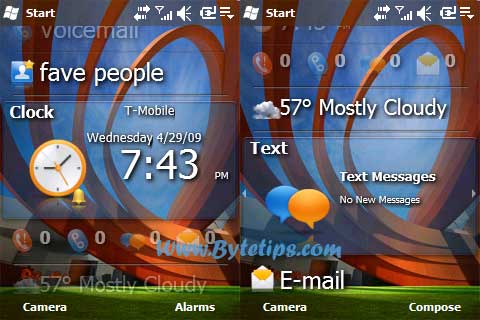
Its beta Plugin for windows Mobile 6.5 ROM Users. I myself use windows mobile 6.5 Rom on my T-mobile MDA. If you want to see how it looks on my MDA Check Here : Windows Mobile 7 Look and feel On MDA. Window Mobile 6.5 Titanium Plugin looks great on MDA. If you are running a custom Rom wm 6.5 on your device you might want to try the new style with some extra Panels.
Developer of this plugin trying to make this theme look like Windows Mobile Phone 7. This plugin ads new look and feel to Windows mobile 6.5 Chome. also edit the theme and panels using Chome editor. Chome editor Looks like this..
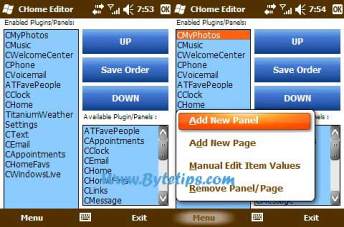
Its easy to edit Chome (Titanium today Screen ) using CHome editor utility. You can add new page and You can manually edit item values..
Requirements:
This theme is Only for Windows Mobile 6.5 Users. (use customized Rom )
It supports QVGA, WQVGA, VGA and WVGA Device.
What you get: The plugin developer added Titanium Weather, custom Programs panel, CHome Editor and Favorite People Plugin to make Windows Mobile 7 style.
Here is the download link for this theme: Wm7 Theme.

For more info and Latest download link please visit Plugin Developers Site Here: http://www.ibrythill.com/windows-mobile/
I have a question: can the contents/items in titanium be dynamic in any way?
Cool! But most people are using WM 6.1 or older, not much people using WM 6.5 at the moment. 🙁
I disagree. Most people that i know have the WM 6.5 and are really happy with it
How the heck do you uninstall this, it doesnt look good at all on a qvga and takes too much memory…bleeech please tell me how to get rid of this.
It looks good on my pocket pc device.. I tried with different device.. By the way you can install different styles. I am using different skins.. To uninstall try from remove programs .. Or else reset the device.
how do i upgrade my omnia to windows 6.5 or higher???
Well, I may say that I’m as curious as you seem to be… but, as I read, you have to take some actions first, like backup (imagine that something goes wrong? Imagine that something’s not compatible with omnia?…. Or you just imagine that you don’t have, or cant get, all the drivers you need for mobile 6.5?)… you may say that’s too much imagination, but for as I read until now, it’s all close to 100% sure… But still, if you would like to do that, I can give you some links where you can get it, and get a little bit more info about it.
for backups, check sprite backup (www.spritesoftware.com) you can have it trial, 10 days working, that I think that’s more than enough to see if you would like to keep, or not the new rom.
And this new rom (mobile 6.5, and blablablabla) you can find some different options (
http://omniabrasil.blogspot.com/2009/08/rom-khuanchai-com-windows-mobile-65.html)… I dont know if you understand portuguese, but if you dont, you may use google translator to help you.Still, you may find interesting this article:
http://www.mobilehornet.com/archives/2289PS: If you decide to upgrade your rom, Please give me your feed back…. I still trying to decide 🙁
See ya
Jay