
Open CD-rom Tray Manually

January 26, 2008 Poster: Jim Views: 1,647 views Category: Cool tricks, Hacks, Pc Tips, Video Tutorial

Welcome, Visitor. Subscribe to our RSS Feed and consider adding this article/site to your favorite social bookmark site if you find it useful. Thank you!

sometimes CD-rom or DVD Rom door won’t open.If you want to Open CD-rom or DVD Rom Tray Manually then you can apply this simple tricks.

1. At first you need to get a needle / paper clip.
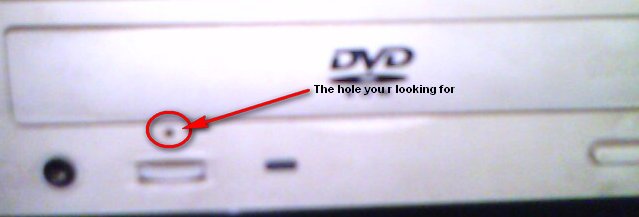
2. Then find a small hole on the front of the Cd-Rom. I attached a picture here:
cdrom Open CD rom Tray Manually

3. Insert the needle / paper clip in the whole and push. You r done.

Tags for the article:

    how to open cd rom,how to open cd rom manually,open cd tray,open cd rom,how to manually open cd rom,how to open cdrom,how to open cd-rom,how to open a cd rom,manually open cdrom,cd rom wont open

Share This:

This Seems Useful!! Help Us To sahre This Post with Rest Of The World
  • Digg
  • StumbleUpon
  • Technorati
  • del.icio.us

Subscribe:

Sign up to receive latest Tips & Tutorials
as well as receive other site updates!

Related Post

Open CD-rom Tray Manually
Changing Default path For Installing Apps

you can change the default installation drive and/ or directory by using a Registry hack. Go to: 1.Start > Run Type regedit Go to this...

Open CD-rom Tray Manually
Get Rid Of Thumbs.db

There’s a file called Thumbs.db in almost every one of the folders on my computer. What is it and how do I get rid of it? Thumbs.db is a...

Open CD-rom Tray Manually
Disable CD Autorun

To Disable CD Autorun1.Right Click on My computer > select 'Manage' 2. select category 'Services and Applications' and Click 'Services' 3. check...

Open CD-rom Tray Manually
Burn .bin file Without .cue

you can use Alcohol 120% and other image Burning Software to burn directly from the bin file Or you can Use this Method:To burn a bin file, you...

3 Responses for "Open CD-rom Tray Manually

Leave a Reply

Please note: Comment moderation is enabled and may delay your comment. There is no need to resubmit your comment.