
Few days ago I shared a trick about Google hot trends to get some quick traffic on a blog or website on my web traffic plan. If you don’t know about Google trends, consider reading that topics about Google trends and web traffic. Recently one of my blog readers emailed me to ask a quick way to earn money online. I am not an expert but today I am going to share a trick to boost online money earning using Google trends. I saw that this trick is one of the hottest earning methods from adsense and affiliate link. Because popular keyword and popular product related talks can bring more traffic plus revenue from a Blog. You can use this method one of your test blog to see how fast you can earn from online or from any pay per click program like adsense. I believe this can help you to earn some quick revenue from ppc.
Before you start I need to remind you one little bad side. The bad side is this trick may take some time if you are starting a new blog. Your blog need to be indexed on the search engine at first. Until then you can’t earn from adsense without any traffic on your site. Hopefully Google will index your site quickly if you use Google trends. Check the free requirements for this plan and follow the steps to start your own fast money earning blog:
Free requirements checklist for this method
1. A free account with Blogger blog
2. Adsense and affiliate accounts which will make us money
3. A good browser and a good word processor
First step: Setting up blog
To get some quick revenue at first you need a free blog that support Google adsense or other ppc (pay per click) programs. I suggest free Blogger blog for that. You need to choose a title like Random talk of the day or Top talks of the world etc. Just start with a title that works with random topics. The main reason behind choosing this kind of title is to support various kinds of topics in one blog. We are going to set a blog with all in one topic. So set up a free blog with keywords that refers to random topics. Use fast loading css blogger theme for your blog. Try to use fewer images on the blogger theme. Search for free css blogger theme on Google and you will find some free templates for your blog. Check this link to create a blog with Blogger. You can use different blog platform like wordpress for this. I recommend blogger blog because it’s easy to get traffic to a blogger blog.
Second step: choosing the right topics
At first you need to find juicy articles for your blog. Every hour Google shows hottest topics around the world. Go to Google trends and try to pick less competitive keywords from there. You will find different kinds of keyword on Google trends. Some keywords are product related and others are some persons name etc. Take a look at the screenshot below.
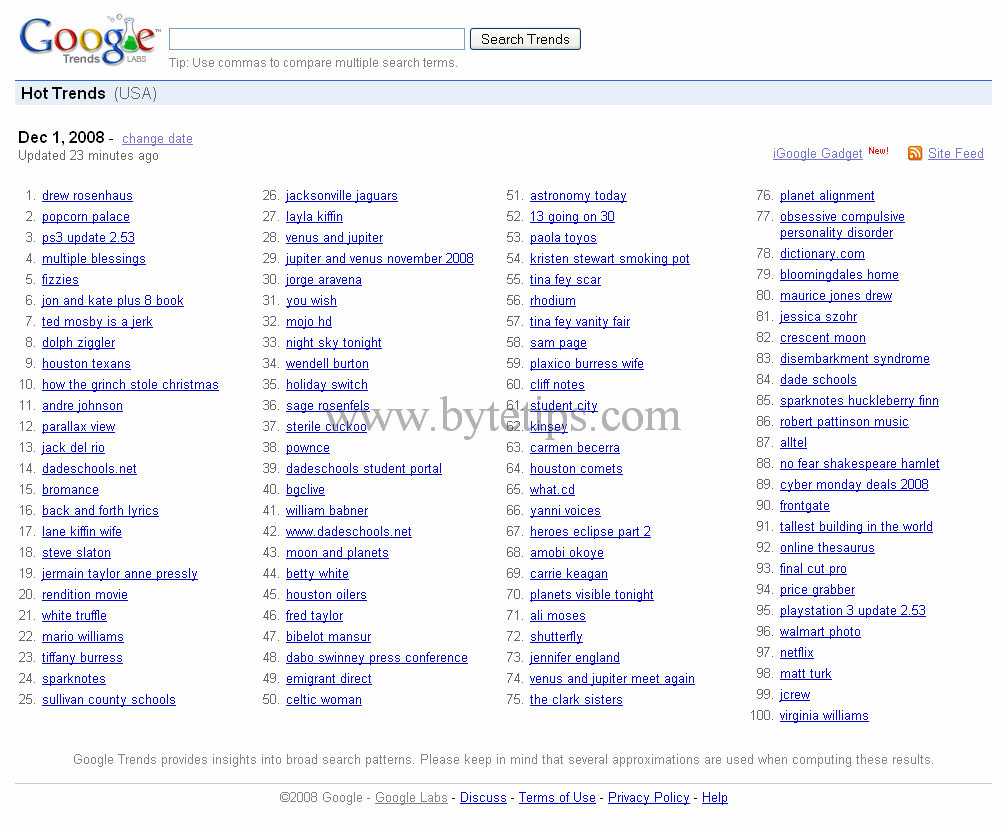
If you click on one those keywords you will see details about that keyword. You will find different related search, newsletter and written articles about that. Now you have to make a blog post about the keyword/news item that you picked from Google Trends. The news headline will be the title of the blog post. For example, if clicked on the keyword ps3 update 2.53, your title can be Hot psp3 update 2.53 or Latest psp 2.53 update Etc. After choosing the title just copy and paste the article or news item from any of news listings from the bottom of Google Trends. The article should include all the details of the keyword. You should pick the right article for that. Then write and add a little description about that keyword on the top of the article. For example new psp 2.53 update released… bla bla etc. Then give credit to that source at the end of your post. And Include the URL to the original source. This is very important for copyright facts .you will get some quick traffic on your blog. Now read how to get benefit from those articles.
Final Part: Adding Adsense or PPC Advertising or get benefit
You have to expose your Adsense ads as much as possible. For Adsense I recommend using a 336*280 large rectangle at the top other article and a wide sky scraper in the sidebar of the blog. Then use 250*250 square within the post. Blend the colors of Adsense ads with your Blogger template. I hope you will a get a good CTR (click through rate) on your ads using this setting. If you are product related keyword then find a good affiliate related to that keyword and modify your article. Recommend the affiliate product to your reader you might get some quick commission cause your traffic is the affiliate product related.
You can apply this trick to boost your online income instantly. So have fun with this trick and don’t forget to share your thoughts and comments.
Really good article! Thanks a lot, now I`m going to try something from here!
@Deca –
I am glad to to see that you liked this article. I hope it will help you to boost ppc revenue
Great article.
Recently I turned an old domain I had into a Hot Trends type blog. Unfortunately it hasn’t sent me either visitors or cash!
The current layout holds to much information: it seems to me like you need a simple straigh forward template, no fancy gizmos – like to recommend a few got templates for Hot Trends?
Kevin
Ireland
OK the one I was using was BranfordMagazine. It’s a great theme, unfortunately for Hot Trends I think there is to much detail there.
Prosense is not a bad theme but I like to add a few images and a bit of video and it is a little bit difficult to do here.
So anyone like to recommend a good WP Theme suitable for Hot Trends – go on it’s almost Christmas
Keivin
@Kevin –
Kevin a simple fast loading theme will work. You can also use adsense ready theme. Expose your ads as much as you can. Match the colors with your theme. Post on that blog every day. It worked for me. Hope it works for you.
This blog rocks! I’m learning so much from the discussion. You guys are great!
There are lots of Affiliate programs out there like Amazon, Clickbank, etc. Just sign up with them and see what works for you.`–
Thanks Jim for the related information what I was looking for. But you know google trends changes rapidly and and to generate traffic is not an easy matter. New SEO techniques are also required and original content is the master that can slave search engines..I think so.