
Check Out some amazing Command Prompt Tricks. I am updating cmd tricks while learning. I found found some Command Prompt tricks I collected few years ago while cleaning junk from my pc last night. I test lots of freeware to find out best freeware programs for my needs. Anyway.. This cmd tricks are Old but still fun and useful. So here we go…
XP & windows 7 and windows 10 Related Tricks – Still own Xp and Windows 7 Machine.
Watch A Movie Created with Command Prompt

Command prompts movie..!! amazing Creation. But you need active internet connection to enjoy this movie. It’s a star wars movie. Here is how to watch this movie :
1. Go to Start > Run and type in cmd
2. You will see the command prompt window . Now type in this command line.
telnet towel.blinkenlights.nl
And hit Enter. Now enjoy the Star wars Movie.
How to Shutdown PC On your LAN Network
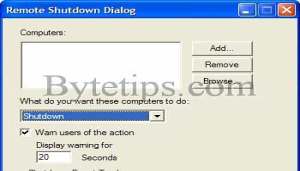
This trick will shutdown a selected pc from Your LAN network. You can apply this trick in your office or school.. but i take no responsibilities for any action. Its just for fun. Here is how to use this trick :
1. Go to Start > Run and type in cmd
2. You will see the command prompt window . Now type in this command line.
shutdown.exe -i
On windows 10 you will see following:
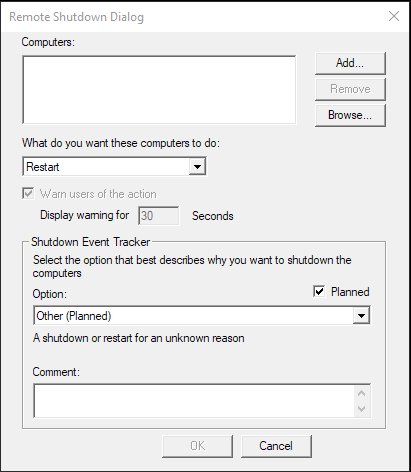
And hit Enter. You will see remote shutdown Window. If you know someone’s IP on a computer in your Local Area network, type in their IP Address after clicking the add button.
3. After entering the IP Address click OK . Now watch the person’s face as their computer shuts down.
Some users have asked me that they got Access Denied error for remote shutdown. Add the user with the privilege to force a remote shutdown on the computer you are about to Shutdown. To do this go to control panel > Administrative Tools > Local Security Settings. Now go to Security Settings > Local Policies > User Rights Assignment. Double-click on Force shutdown from a remote system in the right pane and Click on Add User or Group. Add the computer that runs the remote shutdown command.
Or you can do this go the computer you are about to Shutdown
a) Go to Start > Run > type in Regedit in the dialog box and hit enter
b) Go to My Computer/HKEY_LOCAL_MACHINE /system/currentcontrolset/control/lsa
c) Find “forceguest” in the right pane Double click on it to modify This entry change the value from “1″ entry to “0″
Some Other Fun on Command Prompt
At first start command prompt from Start > Run, the type in cmd click on OK and enter the following command:title your Custom Message
Here your Custom Message indicates any message. Then hit Enter check out the title bar of
the command window. Just a cheap little trick…
Here is another.. Run command prompt and type in
prompt whatever you want it say
For example if you type prompt hello your c: prompt will change to hello
4. Open in command prompt context menu : If you use command prompt more often then this trick is for you. This is a quick trick to open any folder in command prompt quickly.
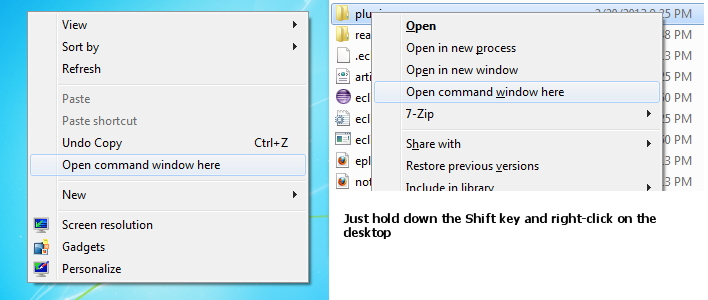
At first select the folder on the explorer and hold Shift key + right-click. Then select Open command window here .Then CMD prompt with the path to that folder directly open.
How to list all installed version of WSL from Windows 10?
Click on search button from start menu:  Or you can hold Windows key +Q to bring search. The search for PowerShell
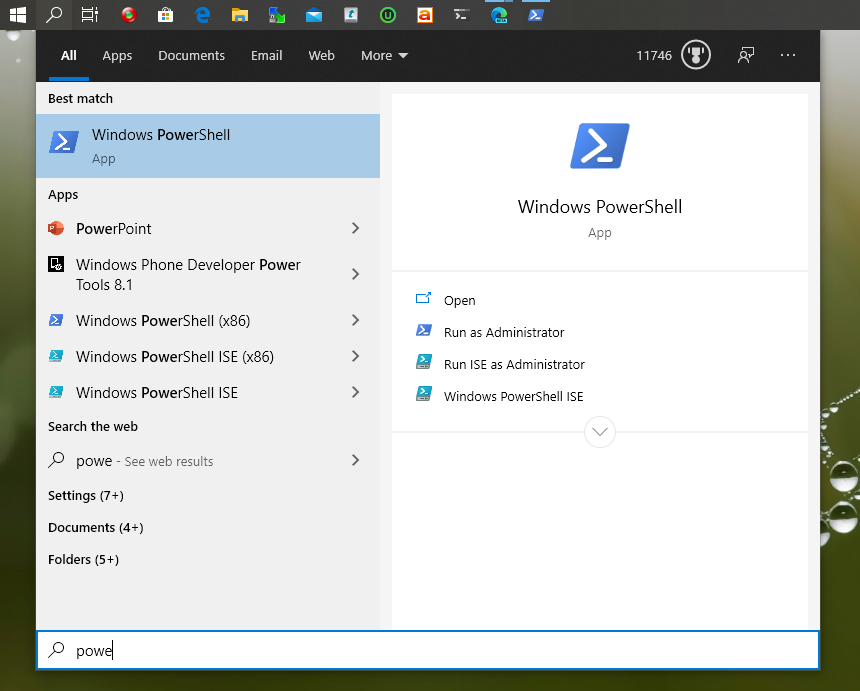
Now run PowerShell as admin. To list all installed version of WSL type in wsl -l
You will see all installed version of wsl
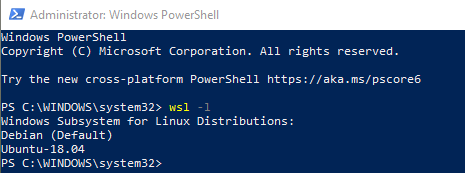
For my personal use I use nice terminal emulator MobaXterm to start PowerShell and Wsl. You can find more details here : How to use MobaXterm with wsl windows 10
That’s all for now Have fun and enjoy..
LOL! watched the Star Wars movie! Awesome! Even better in Matrix green and black
How did you get the starwars one to work? Always says “doesnt recognize telnet”
It works fine using my internet connection. Run cmd then copy – paste the line and press Enter.
It’s due to you not having activated your telnet connection on your pc. While it comes on your PC you have to go in manually through your control panel and turn your telnet client ON. This will allow you to view said Star Wars video.
if you have windows 7 or vista you have to turn on telnet by going to control panel>system and security>check off telnet client>ok>it works now
I cant find that on Vista
No, it’s actually Control Panel, Programs, and then Turn Windows Features on or off. In the list, scroll down and tick the Telnet Client. Click OK to start the installation.
simple, copy&paste 🙂
If you have windows 7 go to control panel->programs->turn windows features on or off than on the window that pops up scroll down and you will see telnet client and telnet server, activate both and OK.
Maybe, you have some “typo” cuz’ it says you have to type telnet towel.blinkenlights.nl
do this:
1
Open the Command Prompt. You can open the Command Prompt by pressing ⊞ Win+R and typing cmd. Windows 8 users can also press ⊞ Win+X and select Command Prompt from the menu.
In order to view the ASCII Star Wars movie, you will need to have an Internet connection.
2
Install Telnet. Most newer versions of Windows no longer include Telnet, which is the client required to connect to the ASCII Star Wars movie. This includes Windows Vista, 7, and 8. You can use the Command Prompt to install Telnet as long as you are logged in as the Administrator.
Type pkgmgr /iu:”TelnetClient” and press ↵ Enter
Enter the Administrator password or confirm that you want to proceed if you already have Administrator access.
Restart the Command Prompt. You can close the Command Prompt by typing exit or by clicking the close button in the corner of the window.
3
Start Telnet. With Telnet installed, type telnet into the Command Prompt and press ↵ Enter. This will start the Telnet interface.
4
Open a connection. On the Microsoft Telnet command line, type o and press ↵ Enter. The command line will change to ( to ).
5
Enter in the ASCII Star Wars address. Type towel.blinkenlights.nl and press ↵ Enter. The ASCII Star Wars movie will begin playing after the initial credits. Enjoy the show!
will this work on a mac?
i guess…
Pls if I want to shutdown a pc on my network, after typing the persons ip address it will tell me access denied and it will not shut the pc down what will I do?
Do you have access on that pc via network? Open CMD and type in shutdown /? to find available command list. You can use computer name to remote shutdown any pc. You need to find out the exact pc name. Then add that name to the list.
Here is an example: \\computername
Yeah, but if the computer u are using is not owned by you, the administrator could have made your access resctricted and you will not be able to use this command, i’m positive that it is this way at school, they already have the command prompt blocked at our school, so im sure that they realize that someone could get past it and try, so they have access denied for that too.
find your computers run file and type in cmd and it should pop up
It’s not as simple as openening cmd on the school computer system. They have blocked certain files so you can’t even use a notepad command saved on a notepad document to open the cmd. I’m not sure if there is a certain way to get on cmd anymore within the schools, the administators have gotten around to most of the problems with cmd and have blocked access to pupils on most of the issues of concern.
cmd is blocked and i looked up other ways like doing it through excel and it is still blocked so i can’t get in cmd to do all this stuff it is blocked at all the schools ecept college cause i put a virus from command prompt on the computer
You can get in 2 cmd by using a new txt doc and saving it as a .bat file then placing it in this location.
go to computer click local disk c:, then program files, then DonJohnston, CoWriter, Text Files it gets around the block but you still have to use it like you were using notepad though.
To get the command prompt, go into notepad, type in command.com and save it as .bat under all files, not text file. then open it and the command prompt should come up.
The other pc also needs to have it’s firewall turned off most likely
How can u gain access when shutting down computers with “shutdown -i” every thing i have tried doesnt work wanting to mess with friends on school computers 😛
Sorry 4 interrupting. i think tha you have to b come the administrator first, b4 u can use the “shutdown -i”. to the change the admin password open the cmd, type “net user Adminstrator *”. then your mission completed… ^_^
I have the same problem! Access Denied! How do you get around this?
I have updated the post check it out.. it should work for remote shutdown access denied error.
Awesome! Works great! Thanks for your reply! But…the question is now..can you remotely change that User Rights??
would you be opposed to me suggesting some extra tricks?
for instance: finding computer names/IP addresses that could be used with (shutdown /i)
also: with windows XP, sending messages to other computers
and plenty more…. MuaHaHaHa.
how do you get peoples IP Addresses?
if you type in ip config /all it will or you can type in config /username of the victim and it should give you the ip
i tried it it won’t work dude
just type ping computername, just replace computername with the actual name.
the star wars movie wont let me watch it beacuse it says telnet is not on the network or somthing.
hi,
Where I can find the sloution for access denied error whiele shuting the remote pc??
hey, im running windows vista. I’ve look all over this computer and i dont have local security settings at all.. either im looking in the wrong place or its not on my computer. how else can i remote shutdown my computer?
How do you find there IP?
how do i do this on windows 7?
LOL the movie was great hahaha how did they do that?
If the command prompt isn´t available on your school computer, try going to “my documents” then hit ur right mouse button and click on “new shortcut” and type “%windir%\system32\cmd.exe”, this should give you acces to the command prompt.
To get the ip-adress of someone´s pc, type in command prompt “net view”, a list of computer names should appear. Then type “tracert [computer name]” and the ip-adress of the computer you want to shutdown should appear.
If you can’t access command prompt you could open up notepad type in “command.com” then save as a .bat file and Boom you have cmd
when i try this it says “the network path was not found” any ideas?
Hey ! thanks .I need some more it so helpful for me .it’s really interesting and knowledgeable……thanks
Hey, i got cmd at school. At home, i went to notepad, typed in $echo off
command.com
I got cmd
Oh, and i saved it as a .bat file.
Hey guys, I found another but similar way to do the shutdown thingy. First, go to Network and then you should be able to find computer names connected to your LAN network. note down the one you want to shutdown then go to Command prompt and type “shutdown.exe -i” then in the box wherre you would normally type the IP address, type the computername itself! It actually works!!
HELO FRIENDS,JUST SO TO START BUTTON > RUN >TYPE(SHUTDOWN -S) > AFTER SUM TIME COMPUTER WILL BE SHUT DOWN,IT’S SO SIMPLE.TRY IT
dummy it take 30 seconds wat kinda computer person are you lol
try this insted
Shutdown –s –t 22 –c “hahahhahhahahahhahaha ur computer must DIE ”
nice work guys
dude there is a problem..after double clicking the force shutdown the remote system..add user group is displayed and after adding another dialogue box is displayed saying name not found ..as i entered the correct name it cant takes..can anyone tell me how to fix this problem..
I tried accessing the control panel at my school. It says i need administrator rights. Any fixes?
if a friend shuts my computer remotely,hoe can i abort it when I’m not the administrator…….please help……
Go to cmd and type in “net user Administrator”
Makes you admin
How do you reset the drive name after you type prompt whatever you want it say into cmd
one way you can see the ip addresses of your network to shut them down, is to go command prompt, then type “cd C:\windows\system32” then hit enter….after that it should have changed your directory,,, then you type “net view” and it gives you a list of all the ip addresses on your network so just copy them into the remote shutdown and pwn them ;P
i double-clicked force shutdown from a remote system, but i couldn’t click the add user or group because i need Windows 2000 service pack 1 or later but i have windows 7 with service pack 1. what do i do?????
I type the starwars movie code, but it says “telnet is not recognised as an external or internal command
Help PLZ!
dude how can I use the net view option in CMD<,,so that I can hack into other's haard drives using CMD???