Samsung Omnia Style For Pocket pc

October 09, 2008 Poster: Jim Views: 10,682 views Category: Pocket Pc

Welcome, Visitor. Subscribe to our RSS Feed and consider adding this article/site to your favorite social bookmark site if you find it useful. Thank you!

Update: For Application and Today Plugin from omnia you can read this:  Real Omnia Today Plugin

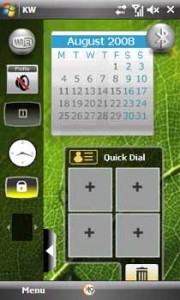
Recently i am interested in a new project called FEWidgets . It brings Samsung Omnia Style (Omnia like widgets) on Windows Mobile Devices. Here is a some screenshots on  this project.
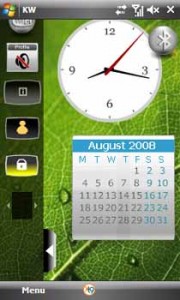
fewidgets1 180x300 Samsung Omnia Style For Pocket pc fewidgets2 180x300 Samsung Omnia Style For Pocket pc

If you want to try it on your Windows mobile pocket pc, You need to make sure that you have .NET Framework 3.5 and Flash 7 for Pocket PC (Flash Lite Won’t work) installed. you can drag drop widegets in your today screen. And you can arrange them as you like.  you can see a this youtube video

to find out more about this Plugin. It will give you the idea how it works. This plugin have some cool widget collection like  Weather widget, calender widget, Missed Calls and some more. you can even change the background from the plugin.

This samsung Omnia like widgets style worked in my MDA. Developer of this project is working hard to add some cool features. you can create your own widget and can add it. Developer provided Source Code, Widget creation Documentation and download link for this Plugin.
In order to create a plugin you must follow just a few steps:

- Create the widget UI on Flash
- If necessary create a Command Provider for required new FSCommands
- Deploy on a zip (see the docs)
- Native FSCommands: FILELIST,DIRLIST,READ_REG,WRITE_REG,LAUNCH,SAVE_CO NFIG, READ_CONFIG.
- Easy “Event” architecture providing events from .NET to your widgets.
- Extensible FSCommands through CommandProviders

I shall try to add  some more info on Samsung Omnia plugin as soon as possible.

Source Code: Download

Widget creation Documentation : Download

Download Link for FEWidgets 0.9.1c : FEWidgets-v0.9.1d.CAB

For Latest download Visit this link: Latest Download Link

Tags for the article:

    omnia style,samsung widgets download,samsung omnia tutorial,samsung weather widget,samsung omnia pocket pc softwware download,flash7 download on ppc,widgets for pocket pc,pocket pc widgets,samsung today plugin widgets,samsung omnia ii today plugin

Share This:

This Seems Useful!! Help Us To sahre This Post with Rest Of The World
  • Digg
  • StumbleUpon
  • Technorati
  • del.icio.us

Subscribe:

Sign up to receive latest Tips & Tutorials
as well as receive other site updates!

Related Post

Convert CAB file to OEM package for Kitchen and windows mobile

Recently i started to cook my own ROM with manila 2d.  I customized my Own windows Mobile ROM with useful utilities.  I converted CAB file to...

Phone Spy Beta for remotely spying Conversation

Few days ago i wrote about text monitoring software text Guard for Cell phones..Now Do you want to know how to spy conversation of others.. ...

Samsung Omnia Style For Pocket pc
Windows Mobile Settings for Aktel and Grameen Phone Internet

One of my blog readers from Bangladesh requested me to write tips about how to setup Aktel and Grameen Phone Internet providers on windows mobile...

Samsung Omnia Style For Pocket pc
Add, Delete and Backup T9 words

Today i am going to share a easy trick about how to Add, Backup and restore your T9 dictionary words from Htc Diamond and Tuch Pro. I needed to...

One Response for "Samsung Omnia Style For Pocket pc

Leave a Reply

Please note: Comment moderation is enabled and may delay your comment. There is no need to resubmit your comment.