
One of my blog reader have asked me to write a tutorial about about installing Ubuntu within Windows. This tutorial will show how to install ubuntu with Xp , Windows vista and Windows 7. So here we go.. For this tutorial we are going to use a software called Wubi. So follow the steps bellow :
First step :
For online installation download Wubi from here http://wubi-installer.org/ For Offline installation go to http://releases.ubuntu.com/ then choose the version of ubuntu you want to install. For example if you want to install Ubuntu 9.10 go to http://releases.ubuntu.com > then go to 9.10/. Now download the 9.10 DESKTOP CD ISO. Make sure you downloaded Desktop Cd Iso. Now download Wubi.exe from there(http://releases.ubuntu.com/9.10/). It should be available there. Place both files in same directory. Now we can start installing Ubuntu within Windows. If you have USB SD/MMC/CF multi-card reader go to systray and click on Safely Remove Hardware to Eject card reader drives from your pc during Installation. It’s very important to disable card readers or else You may get an error message displaying
Windows – No Disk
Exception Processing Message c0000013 Parameters 75b6bf7c 4 75b6bf7c 75b6f7c
Wubi shows No Disk error message because all the card slots are empty… but still had drive letters assigned by Windows. If you already started Wubi, fix no disk error message by disabling your card reader.
Second Step:
After opening wubi.exe from your download folder. It should Look like this :
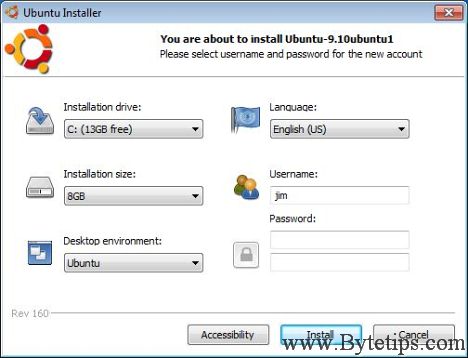
Select Installation Drive , Language , Installation size, username and password from the drop down menu.Then select your desktop environment. For example select Ubuntu for desktop… or something else. Now click on Install button. The installation Will Now Begin.
Final step:
You will see a window asking for rebooting your pc. The window will look like this:
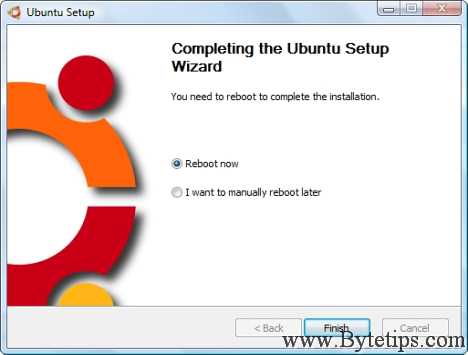
Then click on Finish to reboot your pc. Now you will see a Windows boot manager with your installed Operating system.
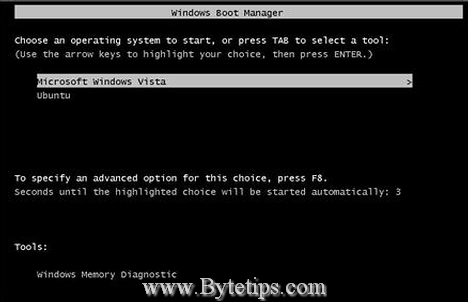
Select Ubuntu from the Windows boot manager list using keyboard and hit Enter to continue. Then Follow installation process for the first time. Login to Ubuntu using the username and password. And you are done.You don’t need to modify the partitions of your PC, or to use a different bootloader, and does not install special drivers. It works as a application. You can even uninstall ubuntu like any other application. If you have any questions let me know. I shall try to help. Have fun…
Hello! Can I install it on the same drive that windows or it should be another drive/partition for it? Thanks
Yes install it on the same drive that windows is using. I will install as a software.. 🙂
Thank you! It works 🙂