
Microsoft releases patch and updates to keep Windows users safe. This updates are important. But 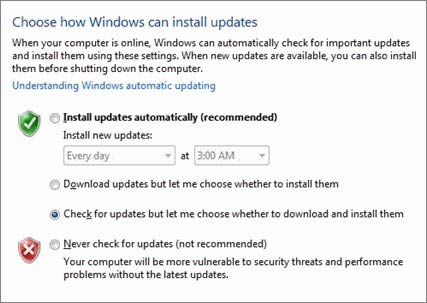 sometimes it can disturb your work. That time you might want to disable this option. When you connect your computer or laptop to online , your computer automatically downloads these updates automatically in the background without your knowledge. While working on a slow internet /wireless connection it can make your internet speed slower. To avoid disturbing your work you can adjust windows updates setting.But don’t forget to enable or check windows updates manually. If you don’t install windows latest updates you might get hacked!! While doing something important you’ll be able to turn off windows update settings by following these steps:
1. Click the Start button, choose All Programs, then choose Windows Update. You’ll see the Windows Update window.
2. Choose Change Settings from the leftmost pane.
3. There you can change installation time, turn of auto update options ETC. Make your changes as you like and then click OK to apply the settings.
you can also view Windows vista update history from your control Panel. To see update vista update history go to control Panel > windows update > view Update History
i tried to following steps but still was not able to tyrn off the updates…
Select never check for updates.. it should work…
F**K WINDOWS UPDATES!!!!! USELESS AND ANNOYING!!!!!!
Updates received until yesterday.error 80070490 has rendered them useless…tried every thing ms has offered to fix…NOTHING!!!!!!!!!!!