
User Account Control (UAC) is a new security component in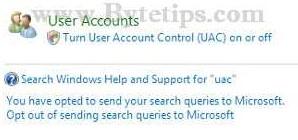 Windows Vista.User Account Control policy prompts at least a couple times an hour and this can slows down normal computer usage.You can disable User Account Control in different ways. Read rest of the tutorials to know how to enable or disable UAC in windows Vista:
From Control Panel:
- Click on Start Menu and start Control Panel
- Type in ‘UAC‘ into the search bar on top of the Control Panel
- It will show you search result of Turn User Account Control
(UAC) on or off - Then Click the box beside the Use Account Control (UAC) to help protect your computer option to remove the check mark.
- You will be prompted to reboot your computer. Do so when asked..
Note: To re-enable User Account Control just select the check box on step 4 and reboot.
Disable UAC using MSCONFIG
To disable UAC from msconfig follow this steps:
- Go to Start Menu Launch MSCONFIG from the Run menu.
- Click of Tools Tab on System Configuration window.
- Scroll and find Disable UAP from that window and select that.
- Then Click on the launch button at the bottom of the window. It will launch a command prompt window. Wait until finish. Then close the window.
- Close MSCONFIG and reboot the computer for changes to apply.
Note: To enable User Account Control protection find Enable UAP in step 3 and do the step 4.