
Rss Feed
Tweeter button
Facebook button
Technorati button
Reddit button
Myspace button
Linkedin button
Webonews button
Delicious button
Digg button
Stumbleupon button
Newsvine button
Youtube button

Enable or Disable Search Indexing in Windows Vista

November 27, 2008 Poster: Jim Views: 362 views Category: Windows Vista

Welcome, Visitor. Subscribe to our RSS Feed and consider adding this article/site to your favorite social bookmark site if you find it useful. Thank you!

Last time i shared a tips about How to disable Search Indexing on windows xp. Then i thought that i didn’t wrote about this trick for Windows Vista Search Indexing. This system process constantly indexes and updates lists of all the files on your system to make their information available for quick searching. If you use windows Vista search function frequently, then its  helpful to show search result quickly. But this service takes a good amount of system resource.

If you don’t use the Vista search function frequently then you can enable or disable Search indexing following this steps:

1. At first Click on the Start Menu and Select Computer ( Go to Computer)
2. Right-click on the C: Drive icon and then Click on Properties. You will see a small window like the screen shot i added here:
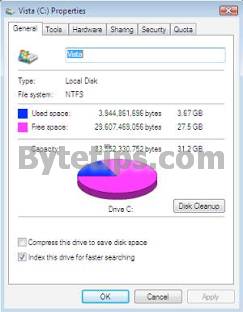
vista search indexing 233x300 Enable or Disable Search Indexing in Windows Vista

3. If you are not on the General Tab, click on the General Tab and remove the check mark from  Index this drive for faster searching
4. A dialog box will appear, select Apply Changes to Drive C:, subfolders and files and Click OK

Share This:

This Seems Useful!! Help Us To sahre This Post with Rest Of The World
  • Digg
  • StumbleUpon
  • Technorati
  • del.icio.us

Subscribe:

Sign up to receive latest Tips & Tutorials
as well as receive other site updates!

Related Post

Enable or Disable Search Indexing in Windows Vista
How to Rebuild Search Indexing On Windows Vista

I faced some problem with windows vista Search option.  My Windows Vista Search feature slowed down and it didn't seem to find files. If you have...

WinUtilities 9.4 Professional Free License

WinUtilities is a an award winning tweaking utility suite for Windows. It Repairs, Optimizes, Protects you windows privacy in a easy way. This...

Leave a Reply

Please note: Comment moderation is enabled and may delay your comment. There is no need to resubmit your comment.


Recent Posts