
Disable Recent Documents List

April 17, 2008 Poster: Jim Views: Category: Tweak, Windows

Windows XP monitors the files you open or use. And Xp stores this information in the
background just in case you need it. If you want to disable Recent Documents List Follow this simple steps:

1. Click the Start button then Click Run. Type regedit in the blank, and then click OK.
2. Then go to

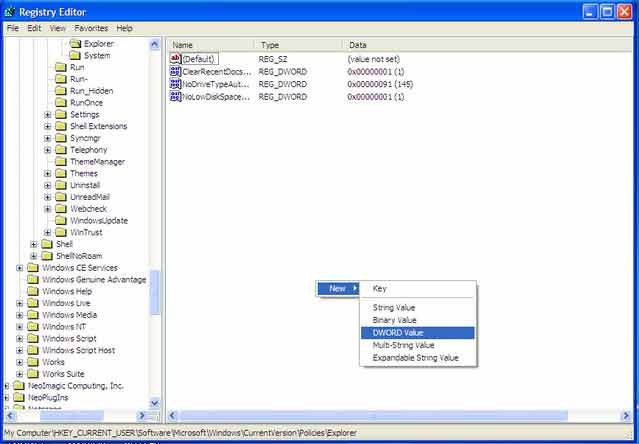
HKEY_CURRENT_USER\Software\Microsoft\Windows\CurrentVersion\Policies\Explorer

3. The create a new DWORD Value and name it NoRecentDocsHistory

Here is a screenshot :
recentdoc 300x208 Disable Recent Documents List
4. Then duble click and open NoRecentDocsHistory type 1 under the Value. Click ok and You are done.

Share This:

This Seems Useful!! Help Us To sahre This Post with Rest Of The World
  • Digg
  • StumbleUpon
  • Technorati
  • del.icio.us

Subscribe:

Sign up to receive latest Tips & Tutorials
as well as receive other site updates!

Related Post

Disable Recent Documents List
How to search Hidden files and System Files In Windows XP

Do you know that Windows Xp can't find hidden and system files because  the Search companion does not search for hidden or system files by...

Disable Recent Documents List
Speed Up DSL-CABLE Connection Speed

At  First, you need to go to Start, then run. 1. Type in regedit in the box. 2. Then, go...

Easy way to Install themes on XP

How to: Install themes on XP Although this is an easy process, many people don't know how to do it and I hope this guide will provide an easy...

Disable Recent Documents List
Tips to change Virtual Memory in Windows Xp

It's best to allow Windows to manage the paging file.For some reason i changed virtual Memory / paging file  in windows Xp. You can manually set...

Leave a Reply

*

Please note: Comment moderation is enabled and may delay your comment. There is no need to resubmit your comment.