
Configure Recycle Bin Properties

January 17, 2008 Poster: Jim Views: 239 views Category: Windows

Welcome, Visitor. Subscribe to our RSS Feed and consider adding this article/site to your favorite social bookmark site if you find it useful. Thank you!

If you want to Configure Recycle Bin Properties

1. Right click on Recycle Bin then click on Properties

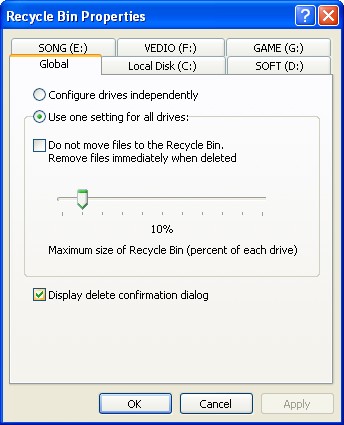
You will see this window:
recycle.jpg

2. you can Configure Drives Independently or can set option by % .

If you check Mark Don not move file to recycle Bin windows will not use Recycle Bin.

Tags for the article:

    recycle bin properties,Configure Drives Independently RECYCLE BEEN WINDOWS 7,windows 2008 share recycle bin,script to show recycle bin properties,script for recycle bin properties,recycle bin property,recycle bin properties disabled Windows 7,recycle bin PROPerties command line,recycle bin properties 2008 policy,how to configure recycle bin in windows 2008 command line

Share This:

This Seems Useful!! Help Us To sahre This Post with Rest Of The World
  • Digg
  • StumbleUpon
  • Technorati
  • del.icio.us

Subscribe:

Sign up to receive latest Tips & Tutorials
as well as receive other site updates!

Related Post

Configure Recycle Bin Properties
Disable the use of recycle bin

If you don't want to use recycle bin then u can disable Recycle bin.Just like when holding the Shift key while deleting items.Go to registry and...

Delete Directly from Pc(Bypass Recycle Bin)

Note:This will delete your file from pc bypassing Recycle bin. Most of the people knows about this little trick. Its easy to Bypass Recycle...

Leave a Reply

Please note: Comment moderation is enabled and may delay your comment. There is no need to resubmit your comment.